 Tlaku
TlakuTlaku › LightBurn alternative
Free software · MIT license
Free open-source LightBurn alternative
Tlaku is free software for laser engravers and cutters. If you are looking for a LightBurn alternative that costs nothing, this page says plainly what Tlaku does today, which LightBurn files it opens and what is still untested.
This is a beta (0.1.2). It has been tested on a single real machine, a Creality Falcon2 Pro 22 W, and high-power cutting has not been tested yet. If your work depends on LightBurn, keep it as a plan B while you try Tlaku.
In short
- Free and open source (MIT license). Donating is optional and unlocks nothing: the program is the same with or without a donation.
- Opens LightBurn projects (
.lbrnand.lbrn2) with their layers and settings, and warns you about whatever it could not bring over instead of dropping it silently. - Imports LightBurn machine profiles (
.lbdev), so you do not have to retype the work area, the controller and the baud rate. - Drives GRBL lasers over USB and the network (tested on a real Creality Falcon2 Pro). Ruida (CO2), K40 and galvo are experimental.
- Windows, macOS and Linux, with the interface and the manual in Spanish and English.
- Clean room: Tlaku was written from scratch, with no code, text, icons or screenshots from LightBurn.
What Tlaku does
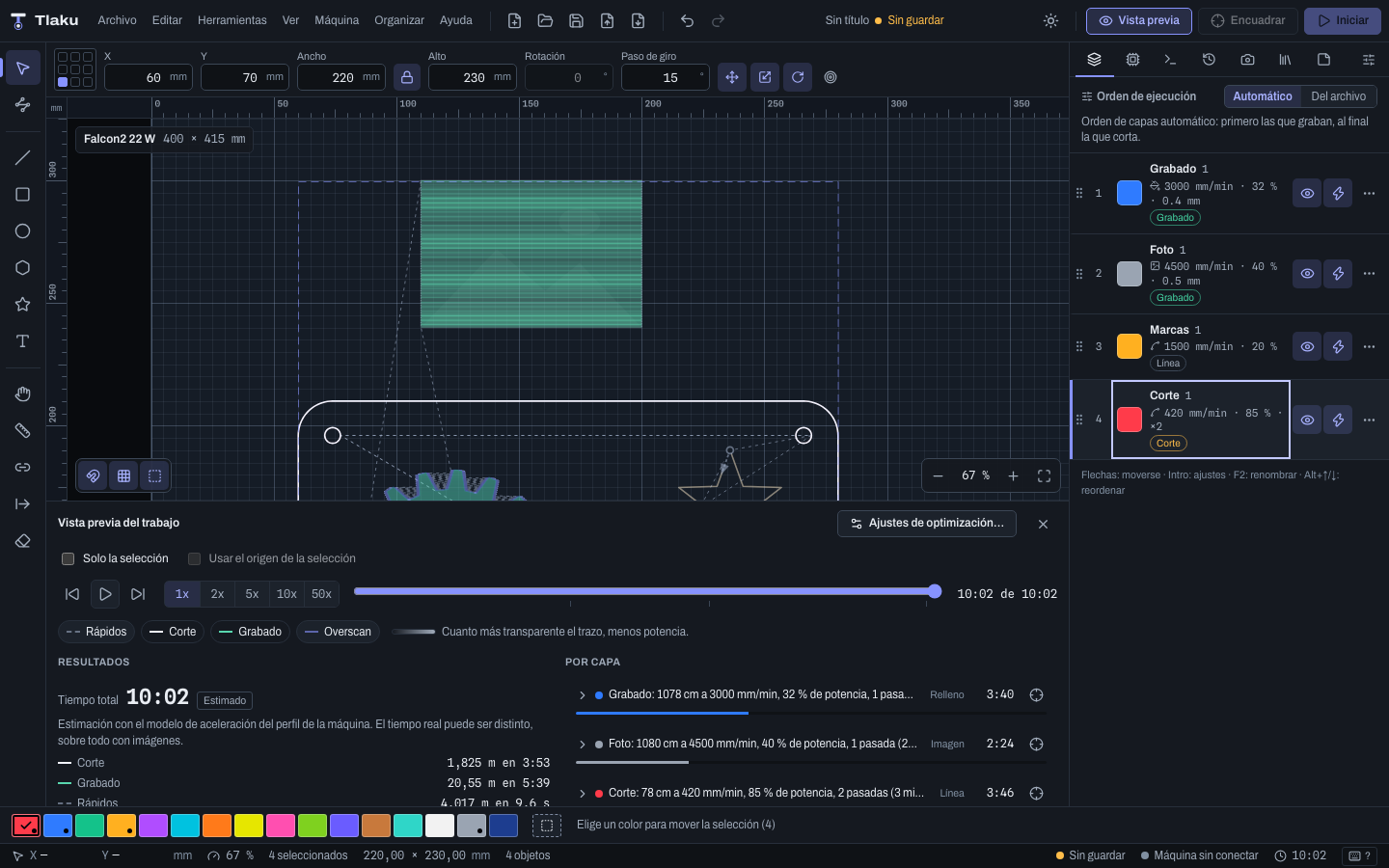
You design or import a job, adjust the layers by color, see how it will be cut and send it to the machine with safety checks before anything moves. Specifically:
- Design and editing: canvas with rulers and the machine bed, shapes, node editor, align and distribute, arrays, boolean operations, text, QR codes and barcodes, variable text and undo with history.
- Layers: Line, Fill and Image modes, with speed, power, passes, interval, image dithering, tabs and other cut settings.
- Preview with an explained cut order, estimated time and a per-layer breakdown.
- Check before sending: the machine state is queried and nothing is transmitted if it is in alarm, paused or has the door open. The app never homes or unlocks on its own.
- Simple mode to get started: five guided steps (open, material, place, review and start).
- Materials and camera: a material library with its sources (starting points, not a guarantee), a material test and camera calibration.
- Production: nesting, Print & Cut and splitting a job larger than the bed into sections (tiling), the latter experimental.
- Phone control and a live view of the job; pause and stop always work.
- Command line (
tlaku) for what the app does.
The full list is in the README and the manual.
Comparison
Only what we can state from the repository and from LightBurn's public documentation. For LightBurn's prices, versions and features, always check its official site.
| Topic | LightBurn | Tlaku |
|---|---|---|
| Kind of program | Commercial program. | Free software, MIT license, open source on GitHub. |
| LightBurn project files | Its own format (.lbrn, .lbrn2). | Opens them with layers and settings. Whatever has no equivalent appears in a notice; check it in the preview. |
| Machine profiles | .lbdev files (and .lbvendor, .lbzip bundles). | Imports .lbdev. It does not read .lbvendor or .lbzip (a .lbzip is a zip: extract the .lbdev and use that). |
| Ruida controller (CO2) | Supported. | Experimental: tested only against an emulator. |
| Keyboard shortcuts | Its own. | Its own, configurable scheme; there is no “LightBurn-style” profile, and some keys mean something else (for example Alt+V). The table is in the manual. |
| Job larger than the bed | Split by hand. | Tiling (splitting into sections with alignment marks): experimental, tested only with the virtual machine. |
Equivalent features and how well tested they are
“Real machine” means the Creality Falcon2 Pro 22 W used in the tests. “Emulator” means it works end to end against the app's emulator and virtual machines, with automated tests, but nobody has used it with a laser yet.
| Feature | In Tlaku | Status |
|---|---|---|
| Layers by color with Line, Fill and Image | Yes. | Real machine lines, fills and images on MDF. |
| Preview with estimated time | Yes. | Real machine for example 61.3 s estimated against 60.8 s actual on a 15 × 15 mm fill, and 139.0 s against 136.9 s on the material test. |
| GRBL over USB (diode) | Yes, with an “Add machine” wizard and detection. | Real Falcon2 Pro Other brands, untested |
| GRBL over the network (TCP and WebSocket), grblHAL, FluidNC, Marlin, Smoothie | Yes. | Emulator Not tested on hardware |
| Ruida (CO2), K40 with M2 Nano, fiber galvo | Experimental. | Emulator or simulated board only Galvo from the command line only. |
| Material test | Yes. | Real machine 4 × 4 grid on MDF. |
| Pause, stop and resume after a power cut | Yes. | Real machine |
| Camera, lens calibration and alignment | Yes. | Partial with the Falcon2's lid camera, calibration and alignment are still pending. |
| Print & Cut and tiling | Yes (tiling, experimental). | Virtual machine Not tested on hardware |
| Phone control and live view | Yes. | Real machine |
What is still untested
- High-power cutting (for example cutting several millimeters of wood or acrylic) has not been tested on a real machine.
- Any machine other than the Creality Falcon2 Pro 22 W: other GRBL diodes, Ruida, K40, galvo, grblHAL, FluidNC, Marlin and Smoothie were tested only with emulators and virtual machines.
- Importing LightBurn projects is covered by automated tests, and several conversions (for example overscan and the through-cut time) were inferred from public documentation: check every layer in the preview before cutting.
- The installers are not signed by Apple or Microsoft; the system will show a warning the first time. The Flatpak and the Raspberry Pi (ARM64) build are experimental and have not been tried on a real device.
- It is the work of one person with no company behind it: there is no commercial support. Bugs are reported on GitHub.
If you own a machine, trying it and telling us how it went (even if everything worked) is the most valuable help: test report form.
How to switch from LightBurn
- Install Tlaku from the latest release.
- Add your machine. With the machine connected over USB, the Add machine wizard detects it without moving it or changing its configuration. If you already had it in LightBurn, in Devices press Import a LightBurn profile (.lbdev)…; the profiles are new and send nothing to the machine.
- Open your project: File > Import Design… with the
.lbrn2(or.lbrn) file, or drag the file onto the window. - Review the notices and the preview. Layer colors are approximate and some settings have no equivalent; the notice lists them.
- Test on scrap material at low power, with your hand near the emergency stop.
Name equivalences, shortcut differences and what is missing are in the manual's Coming from LightBurn guide.
Trademarks
LightBurn is a trademark of its owner. Tlaku is an independent project and is not affiliated with, sponsored by or endorsed by LightBurn or its owner. The name is used only descriptively: to say which files Tlaku is compatible with and which program it can replace. Tlaku does not use LightBurn's code, text, icons or logo.